curl & jq
curl is the universal command-line HTTP client. It's preinstalled on macOS, most Linux distributions and Windows 10/11 (as curl.exe). A curl command is the most portable bug-report artifact: anyone can run it, it shows exactly what was sent, and it fits in a ticket or a CI script. jq is its natural partner. It reads JSON from curl and extracts, filters or checks the fields you care about.
| Key fact | Details |
|---|---|
| Install | Usually preinstalled. jq: brew install jq, sudo apt install jq, winget install jqlang.jq |
| Windows note | In Windows PowerShell 5.1, curl is an alias for Invoke-WebRequest. Type curl.exe to get real curl |
| Best for | Minimal reproductions, smoke checks, timing and TLS diagnostics, CI scripts |
| Practice API | https://postman-echo.com echoes your request back as JSON |
Copy as cURL from DevTools (or write from scratch) → strip noise headers → curl -i / -v to see status and headers → add body, auth and cookies → jq to read the JSON → -w timing and --fail for scripts → paste the final command into the bug reportFirst requests: GET, status, headers and verbose mode
curl https://postman-echo.com/get?env=qa                 # body only
curl -i https://postman-echo.com/get?env=qa              # status line + headers + body
curl -I https://example.com                              # HEAD request: headers only
curl -v https://example.com                              # verbose: DNS, TLS, request and response headers
curl -L http://github.com                                # follow redirects (301/302)
curl -sS -o page.html https://example.com                # silent, but still show errors; save to a file
curl -s -o /dev/null -w "%{http_code}\n" https://postman-echo.com/status/404
How to read curl -v output:
- Lines starting with
*are connection details: the IP address, TLS version, certificate and the negotiated HTTP version. - Lines starting with
>are the request exactly as sent: method, path,Hostand the other headers. - Lines starting with
<are the response status and headers. - The body follows after the headers.
QA tip:-w "%{http_code}"combined with-o /dev/nullprints only the status code. That's the easiest way to check many URLs in a loop. On Windows use-o NUL.
Sending data: JSON, forms and file uploads
# JSON, short form (curl 7.82+): sets Content-Type and Accept to application/json
curl --json '{"name":"QA","role":"tester"}' https://postman-echo.com/post

# JSON, explicit form that works with any curl version
curl -X POST https://postman-echo.com/post \
  -H "Content-Type: application/json" \
  -d '{"name":"QA","role":"tester"}'

# JSON from a file, handy for long payloads
curl --json @payload.json https://postman-echo.com/post

# Classic HTML form (application/x-www-form-urlencoded)
curl -d "email=qa@example.test" -d "password=secret" https://postman-echo.com/post

# File upload (multipart/form-data)
curl -F "file=@screenshot.png" -F "comment=layout bug" https://postman-echo.com/post

# Other methods
curl -X PUT    --json '{"status":"done"}' https://postman-echo.com/put
curl -X DELETE https://postman-echo.com/delete
Quoting differs between shells. In bash and zsh, wrap JSON in single quotes. In Windows cmd.exe, use double quotes outside and escape the inner ones ("{\"name\":\"QA\"}"), or simply keep the JSON in a file and send it with @payload.json.
Caveat:-dwithout-Xsends a POST. Adding-X GETto a command with-dsends a GET with a body, which many servers reject or ignore. Use-Gif you want-dvalues in the query string instead.
Auth headers, Basic auth and cookie jars
# Bearer token from an environment variable, so it stays out of shell history
export TOKEN="paste-test-token-here"
curl -H "Authorization: Bearer $TOKEN" https://postman-echo.com/headers

# Basic auth (Postman Echo accepts postman / password)
curl -u postman:password https://postman-echo.com/basic-auth

# API key in a header
curl -H "x-api-key: $API_KEY" https://api.example.test/v1/items

# Save cookies the server sets, then send them back on the next call
curl -c cookies.txt "https://postman-echo.com/cookies/set?session=abc123"
curl -b cookies.txt https://postman-echo.com/cookies
The cookie jar (-c to write, -b to read) lets you script a real session: log in once, then call the protected endpoints with the same cookies.
QA tip: Negative auth checks are one-liners: drop the header (expect401), send a garbage token (expect401), or use a read-only user on a write endpoint (expect403).
Timing and TLS diagnostics with -w, --resolve and timeouts
-w (--write-out) prints variables after the transfer. This breaks a slow request into its phases:
curl -s -o /dev/null https://example.com -w \
"dns:     %{time_namelookup}s
connect: %{time_connect}s
tls:     %{time_appconnect}s
ttfb:    %{time_starttransfer}s
total:   %{time_total}s
status:  %{http_code}  ip: %{remote_ip}  http: %{http_version}
"| Variable | Meaning |
|---|---|
time_namelookup | DNS resolution finished |
time_connect | TCP connection established |
time_appconnect | TLS handshake finished (0 for plain HTTP) |
time_starttransfer | First byte of the response arrived (TTFB) |
time_total | Whole transfer finished |
All values are cumulative from the start. A big gap between time_appconnect and time_starttransfer means the server is thinking, not the network.
# Hit a specific server behind a load balancer or before DNS is switched
curl --resolve api.example.test:443:10.0.0.5 https://api.example.test/health

# Fail fast instead of hanging
curl --connect-timeout 5 --max-time 20 https://api.example.test/slow

# Force a protocol version
curl --http1.1 https://example.com
curl --http2 https://example.com

# Show certificate details
curl -v https://example.com 2>&1 | grep -E "subject:|issuer:|expire date:"Caveat:-k/--insecureskips certificate checks. It's acceptable on a throwaway local environment, but never "fix" a certificate bug with it. The certificate error is often the bug.
Reading JSON with jq
# Pretty-print
curl -s https://postman-echo.com/get?env=qa | jq .

# One field, raw string without quotes
curl -s https://postman-echo.com/get?env=qa | jq -r '.args.env'

# Field with a dash in the name
curl -s https://postman-echo.com/headers | jq -r '.headers["user-agent"]'

# Count items, pick fields, filter
jq '.items | length' response.json
jq '.items[] | {id, status}' response.json
jq '.items[] | select(.status == "failed") | .id' response.json

# Use jq as an assertion: exit code 1 if the expression is false or null
curl -s https://postman-echo.com/get?env=qa | jq -e '.args.env == "qa"' > /dev/null && echo PASS| jq filter | Does |
|---|---|
. | Whole document, pretty-printed |
.user.email | Nested field |
.items[0] | First array element |
.items[] | Each element in turn |
select(.price > 100) | Keep only matching elements |
map(.id) | Array of one field |
keys | Field names of an object |
-r | Raw output (no quotes) |
-e | Exit code reflects the result, useful in scripts |
curl in scripts and CI: --fail, retries and exit codes
By default curl exits with code 0 even when the server returns 404 or 500, because the HTTP transfer itself worked. In scripts, ask curl to treat HTTP errors as failures:
# Exit code 22 on HTTP >= 400, and still print the error body
curl --fail-with-body -sS https://postman-echo.com/status/500

# Retry transient failures (connection errors, 408, 429, 5xx) 3 times, 2 s apart
curl --fail --retry 3 --retry-delay 2 -sS https://api.example.test/health

# Smoke check used in a pipeline
status=$(curl -s -o /dev/null -w "%{http_code}" "$BASE_URL/health")
[ "$status" = "200" ] || { echo "Health check failed: $status"; exit 1; }
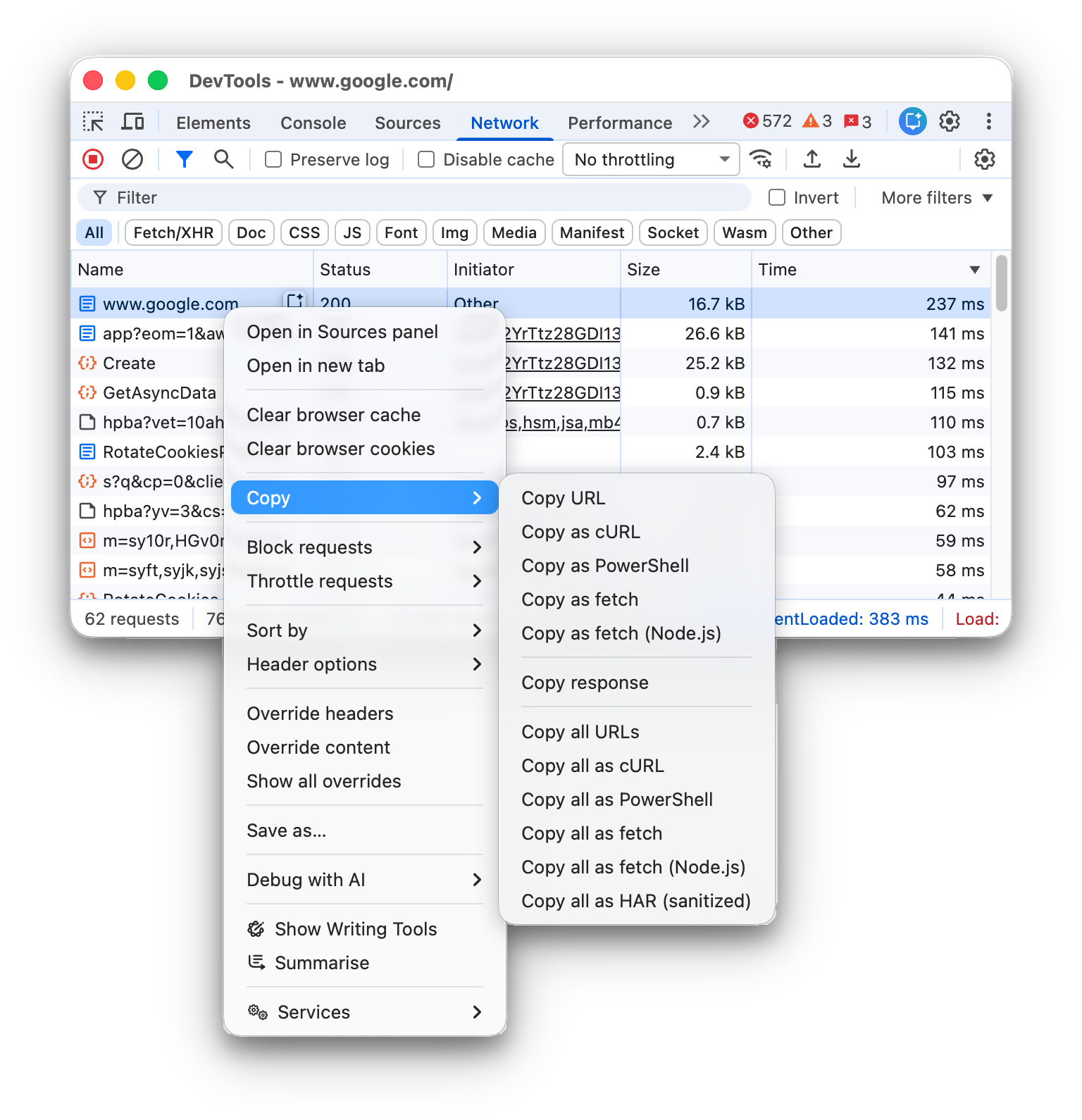
From browser to terminal: in Chrome DevTools, right-click a request → Copy → Copy as cURL. Then delete headers that don't matter for the bug (sec-ch-ua, accept-language, tracking cookies). Keep the minimum that still reproduces the failure.
Cheat sheet
| Task | Command |
|---|---|
| Show status and headers | curl -i URL |
| Debug connection and TLS | curl -v URL |
| Follow redirects | curl -L URL |
| POST JSON | curl --json '{"a":1}' URL |
| Upload a file | curl -F "file=@a.png" URL |
| Bearer token | curl -H "Authorization: Bearer $TOKEN" URL |
| Basic auth | curl -u user:pass URL |
| Cookie session | -c jar.txt then -b jar.txt |
| Only the status code | curl -s -o /dev/null -w "%{http_code}" URL |
| Timing breakdown | -w "%{time_starttransfer} %{time_total}" |
| Pin DNS to one server | --resolve host:443:10.0.0.5 |
| Fail the script on HTTP errors | --fail-with-body |
| Extract a JSON field | curl -s URL piped into jq -r '.field' |
Summary
-iand-vshow exactly what went over the wire. Use them before guessing.--json,-dand-Fcover JSON, forms and uploads.-H,-uand the cookie jar cover authentication.-wtiming variables separate DNS, connect, TLS, server time and download.--resolveand timeouts help with environment and network issues.- jq turns curl into a test: extract fields with
-rand assert with-e. In CI, always use--fail-with-bodyso HTTP errors fail the job.