MQTT is the publish/subscribe protocol behind most IoT products: sensors, smart-home devices, vehicle telemetry, industrial equipment. Devices don't call each other. They publish messages to topics on a broker, and anyone subscribed to those topics receives them. To test such a system you need a client that can subscribe and see everything, publish crafted messages, and inspect flags such as QoS, retain and Last Will. This chapter covers three free tools that complement each other: MQTT Explorer for seeing the whole topic tree, MQTTX for precise multi-client scenarios, and mosquitto_pub / mosquitto_sub for scripts and CI.
apt install mosquitto-clients, brew install mosquitto, Windows installer
Public test brokers (no account needed): test.mosquitto.org, broker.hivemq.com and broker.emqx.io, all on port 1883 for plain MQTT.
Device / service ──publish──► Broker ──deliver──► every subscriber of a matching topic
                     ▲                     │
     test client publishes crafted      test client subscribes to # or a prefix
     messages (QoS, retain, LWT)        and checks what arrives, when and how often
MQTT essentials for testers: topics, wildcards, QoS, retain and Last Will
Topics are UTF-8 strings split into levels by /, for example factory/line1/sensor42/temperature. They are case-sensitive and created on first use.
Wildcard (subscribe only)
Matches
Example
+
Exactly one level
factory/+/sensor42/temperature
#
Any number of levels, must be last
factory/line1/#
$SYS/#
Broker statistics (on brokers that provide them, such as Mosquitto)
$SYS/broker/clients/connected
QoS (Quality of Service) is set per publish and per subscription. The delivered level is the lower of the two.
QoS
Guarantee
Packets on the wire
0
At most once. May be lost
PUBLISH
1
At least once. May be duplicated
PUBLISH → PUBACK
2
Exactly once
PUBLISH → PUBREC → PUBREL → PUBCOMP
Retained message: a publish with the retain flag is stored by the broker as the topic's "last known value". Every new subscriber receives it immediately. To delete it, publish an empty retained message to the same topic.
Last Will and Testament (LWT): when a client connects, it can register a will message. The broker publishes it if the client disappears without a clean DISCONNECT (crash, power loss, network drop). This is the usual way to implement online / offline status.
Session: with clean session = false (MQTT 3.1.1) or clean start = false plus a session expiry interval (MQTT 5), the broker keeps subscriptions and queues QoS 1/2 messages while the client is offline, as long as the client reconnects with the same client ID.
Client ID: must be unique per broker. A second connection with the same ID kicks the first one off. That's a classic source of "random disconnect" bugs.
MQTT Explorer: browse the topic tree, publish and diff
Download MQTT Explorer from mqtt-explorer.com and start it. The connection dialog opens.
Enter a Name, choose the protocol mqtt://, and enter Hosttest.mosquitto.org and Port1883. Add Username / Password and turn on Encryption (tls) if your broker needs them.
Click Advanced to see the subscriptions. By default MQTT Explorer subscribes to # and $SYS/#. On a busy public broker, replace # with your own prefix, for example gimmejob/qa-lab/#. You can also set the Client ID here.
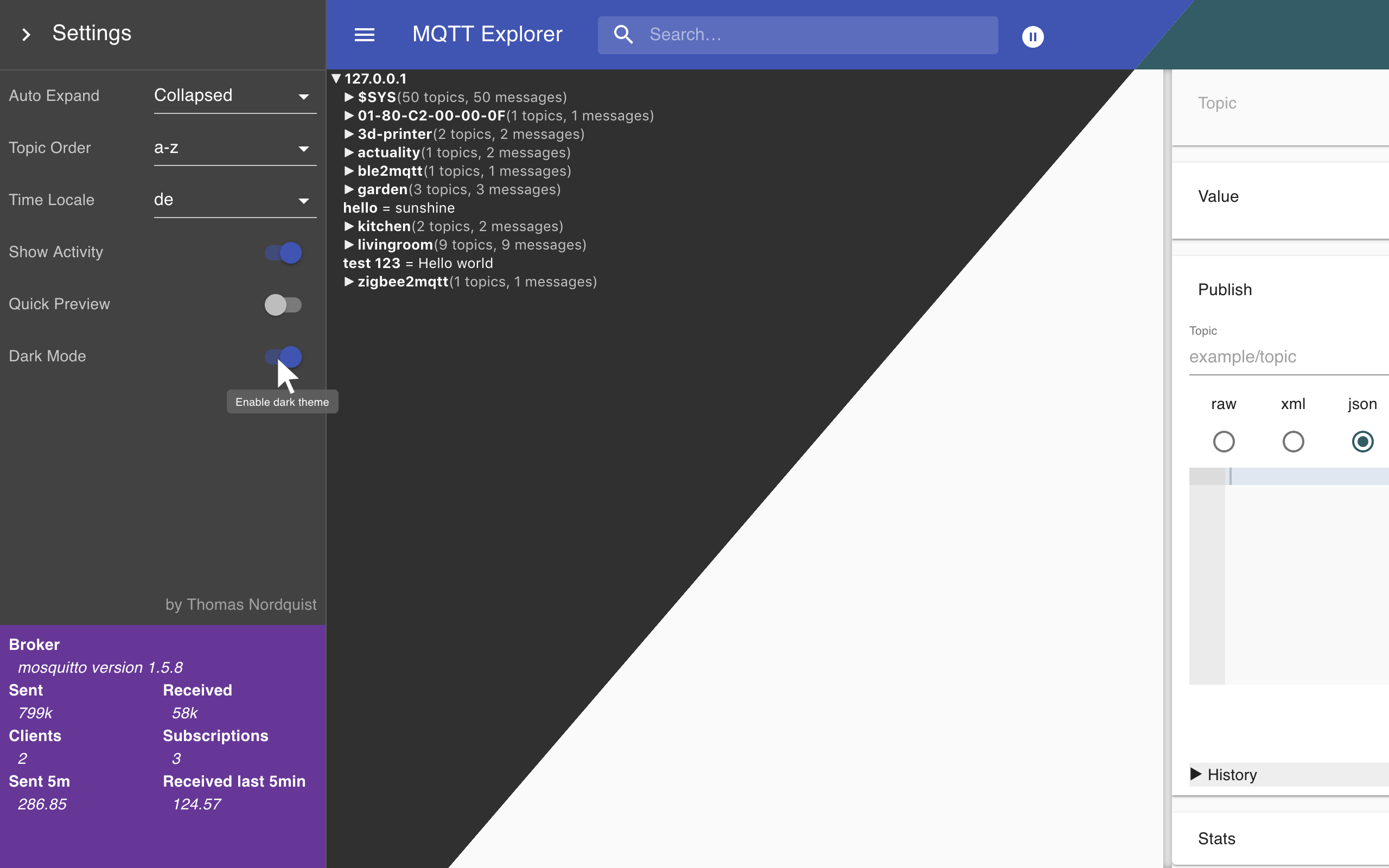
Click Connect. Topics appear as a tree on the left. Numbers show how many sub-topics and messages each branch has, and branches flash when new messages arrive.
Click a topic to see its Value on the right: payload, QoS, retain flag, and the time it was received. JSON is pretty-printed.
Open History under the value to see previous messages. Use the diff view to compare the current payload with the previous one, which is ideal for spotting the one field that changed.
Numeric topics can be plotted as a chart, which is useful for sensors that drift or spike.
In Publish, enter a topic and payload (raw, JSON or XML), choose QoS, tick retain if needed, and click Publish.
To remove a stale retained value, select the topic and click the delete (trash) button. MQTT Explorer can delete a single topic or a whole branch recursively.
MQTT Explorer project screenshot: the topic tree with message details and history.
Caveat: Subscribing to # on a large production broker can flood the app and the network. Always narrow the subscription to the part of the tree you're testing.
MQTTX: connections, subscriptions, Last Will and MQTT 5
MQTTX (by EMQ) keeps several connections open in one window. You can be "the device" in one tab and "the backend" in another.
Start MQTTX and click New Connection (Ctrl/Cmd+N) or + in the left sidebar. Try public broker creates a ready connection to broker.emqx.io:1883.
Fill in Name, Client ID (click refresh to generate one), Host with a protocol (mqtt://, mqtts://, ws://, wss://) and Port (1883 plain, 8883 TLS, 8083 WebSocket, 8084 secure WebSocket on EMQX).
Open Advanced to set MQTT Version (5.0 by default, or 3.1.1 / 3.1), Keep Alive, Clean Start (MQTT 5) or Clean Session (MQTT 3.x), and automatic reconnect.
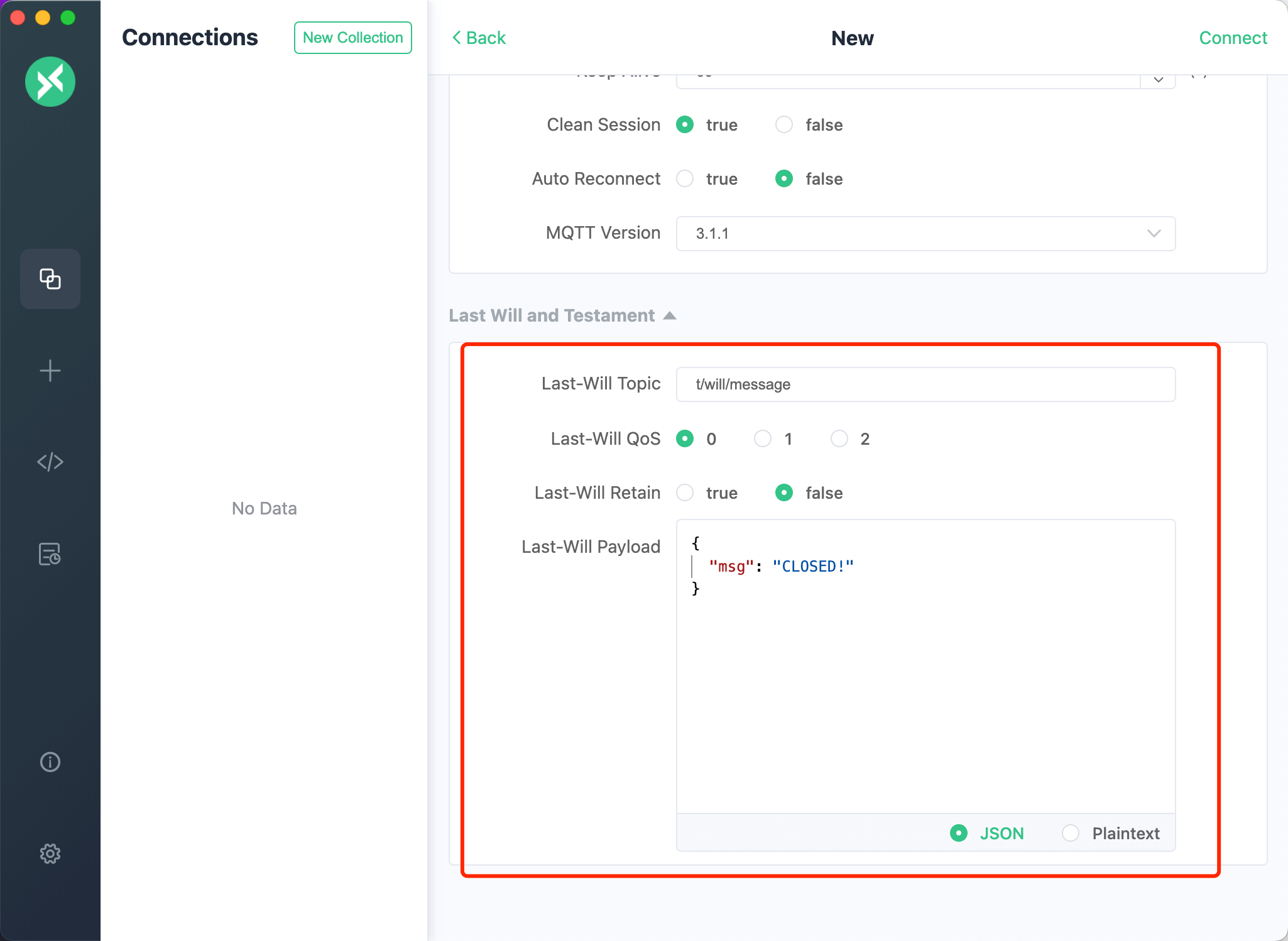
In Last Will and Testament, enter Last-Will-Topic (for example gimmejob/qa-lab/device1/status), Last-Will-Payload (offline), and the QoS and retain values. QoS defaults to 0 and retain to false.
Click Connect in the upper right corner.
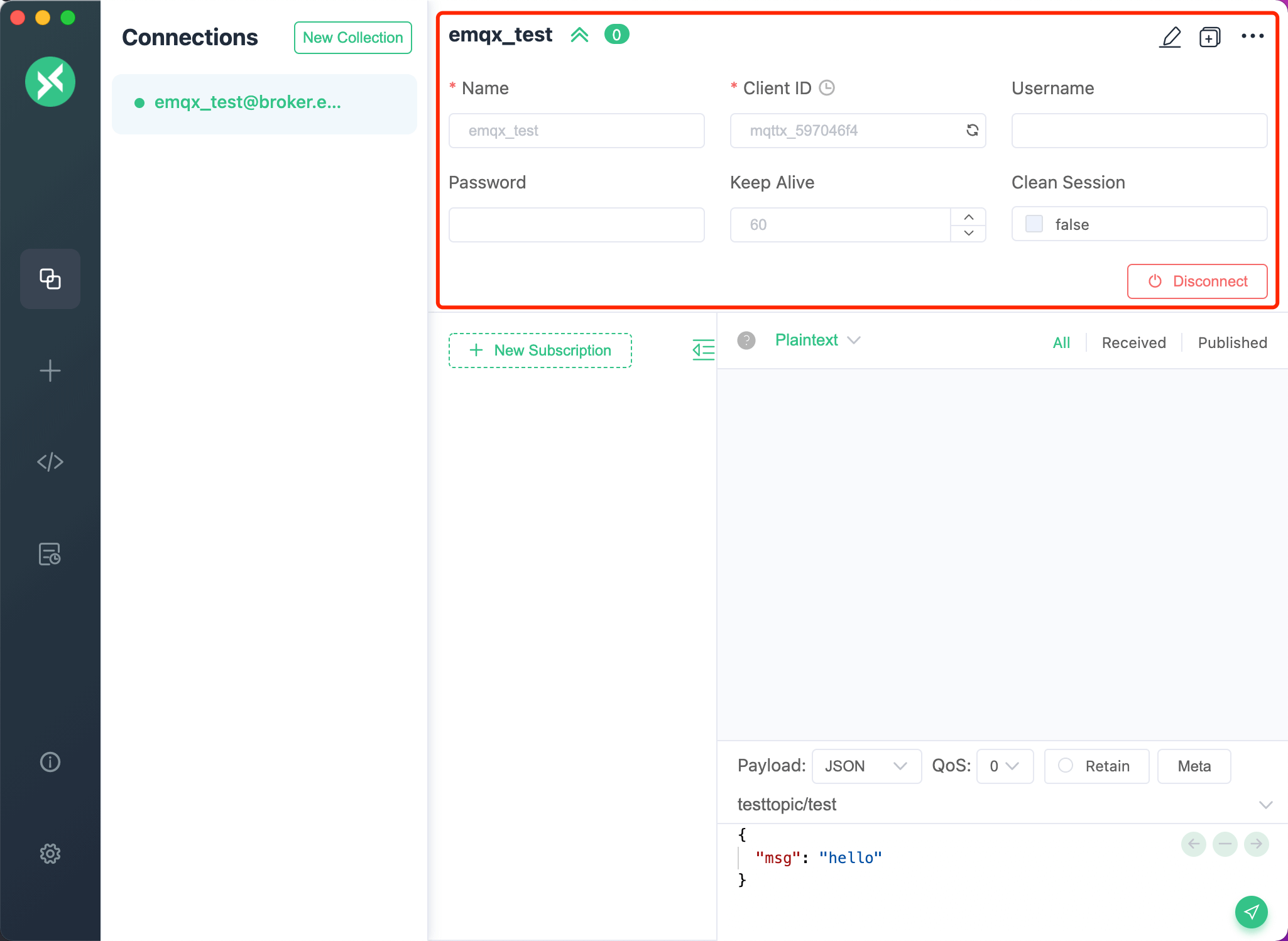
Click New Subscription, enter a topic such as gimmejob/qa-lab/#, and pick a color. Separate several topics with commas.
In the publish area at the bottom, enter the topic, choose QoS and Retain, choose a payload format (JSON, Plaintext, Base64, Hex...), type the payload, and press Send or Ctrl/Cmd+Enter.
Received messages appear on the left and sent messages on the right. Click a subscription to filter the list to that topic.
Official MQTTX documentation screenshot: Last Will and Testament settings in a new connection.Official MQTTX documentation screenshot: the main window with subscriptions, received and published messages.
QA tip: Create two connections with different client IDs: device-sim with a Last Will, and backend-observer subscribed to the status topic. Then disconnect device-sim in different ways and watch what the observer receives.
Mosquitto CLI: mosquitto_sub and mosquitto_pub
Bash
# Subscribe to a whole branch and print the topic in front of each message (-v)
mosquitto_sub -h test.mosquitto.org -t 'gimmejob/qa-lab/#' -v

# Publish one message with QoS 1
mosquitto_pub -h test.mosquitto.org -t 'gimmejob/qa-lab/device1/temp' -m '21.5' -q 1

# Publish a retained status, then clear it again with an empty retained message (-n)
mosquitto_pub -h test.mosquitto.org -t 'gimmejob/qa-lab/device1/status' -m 'online' -r
mosquitto_pub -h test.mosquitto.org -t 'gimmejob/qa-lab/device1/status' -r -n

# Receive exactly one message, or give up after 10 seconds: perfect for test scripts
mosquitto_sub -h test.mosquitto.org -t 'gimmejob/qa-lab/device1/temp' -C 1 -W 10

# Hide old retained messages (-R) and show a timestamp, topic and payload for each message
mosquitto_sub -h test.mosquitto.org -t 'gimmejob/qa-lab/#' -R -F '%I %t %p'

# Register a Last Will while subscribing
mosquitto_sub -h test.mosquitto.org -t 'gimmejob/qa-lab/cmd' -i device1 \
  --will-topic 'gimmejob/qa-lab/device1/status' --will-payload 'offline' --will-retain

# Publish a JSON file, use MQTT 5, show every protocol packet (-d)
mosquitto_pub -h test.mosquitto.org -t 'gimmejob/qa-lab/device1/config' -f config.json -V mqttv5 -d

# Broker statistics (Mosquitto brokers)
mosquitto_sub -h test.mosquitto.org -t '$SYS/broker/clients/connected' -C 1 -v
Option
Meaning
-h, -p
Broker host and port (default port 1883)
-t
Topic. Repeat it to subscribe to several
-m, -f, -n
Payload from text, from a file, or empty
-q
QoS 0, 1 or 2
-r
Retain flag (pub)
-v
Print the topic with each message (sub)
-C n / -W s
Exit after n messages / after s seconds (sub)
-R
Don't print stale retained messages (sub)
-i
Client ID
-u, -P
Username and password
--cafile
CA certificate for TLS. With -p 8883 and no CA options, Mosquitto 2.x clients load the OS certificates automatically
-V mqttv5
Use MQTT 5
-d
Debug: print CONNECT, CONNACK, PUBLISH and other packets
Caveat: Ctrl+C makes mosquitto_sub disconnect cleanly, so its Last Will is not sent. To simulate a crash, kill the process (kill -9 <pid>) or cut the network.
MQTT test scenarios you should run
Scenario
How to test
Expected
QoS 1 delivery
Publish with -q 1 while a subscriber with QoS 1 is connected; watch with -d
PUBACK received; duplicates handled idempotently by the consumer
Retained state for late joiners
Publish a retained status, then start a new subscriber
New subscriber gets the last value at once
Clearing retained state
Publish an empty retained message (-r -n)
New subscribers receive nothing
Device goes offline
Connect with a Last Will, then kill the process
Observers receive the will (offline)
Clean disconnect
Disconnect normally
Will is not sent; app must publish offline itself if needed
Offline queue
Subscriber with a fixed client ID and persistent session goes offline; publish QoS 1; reconnect
Queued messages arrive after reconnect
Duplicate client ID
Connect two clients with the same -i
Broker disconnects the older one; app should report it, not loop forever
Authorization (ACL)
Subscribe to # or another tenant's topic with a restricted user
Subscription refused (SUBACK failure), no data leak
Bad credentials
Wrong password
CONNACK "not authorized" and a clear error in the app
Debugging MQTT: Wireshark filters, $SYS topics and Postman
Wireshark decodes MQTT on port 1883 automatically. Useful display filters: mqtt, mqtt.msgtype == 1 (CONNECT), mqtt.msgtype == 3 (PUBLISH), mqtt.msgtype == 14 (DISCONNECT), mqtt.topic contains "qa-lab", mqtt.qos == 1. For port 8883 (TLS) you need the decryption steps from the Wireshark chapter, or a test broker without TLS.
`$SYS` topics on Mosquitto show connected clients, message rates and retained message counts. A sudden jump in $SYS/broker/clients/connected during a test often means a reconnect loop.
Postman has an MQTT request type (Add → MQTT). It's convenient when the same collection also holds the REST API that triggers device actions.
mosquitto_sub -d prints every MQTT control packet. It's the quickest way to see whether a CONNACK came back with an error code.
Exit codes: when the broker refuses a connection, mosquitto_pub and mosquitto_sub exit with the CONNACK reason code. For MQTT 3.1.1 that's 4 for a bad username or password and 5 for not authorized; for MQTT 5 it's 134 and 135. Scripts can assert on $?.
TLS traffic: Mosquitto 2.1+ clients accept --tls-keylog keys.log. Point Wireshark's TLS (Pre)-Master-Secret log filename at that file to read MQTT over port 8883 in clear text. Use this for debugging only.
Cheat sheet
Task
How
See everything under a prefix
mosquitto_sub -h HOST -t 'prefix/#' -v
Publish once
mosquitto_pub -h HOST -t topic -m 'payload' -q 1
Set a retained value
mosquitto_pub ... -r
Clear a retained value
mosquitto_pub -t topic -r -n
Wait for one message in a script
mosquitto_sub -t topic -C 1 -W 10
See protocol packets
add -d
Visual topic tree and history
MQTT Explorer
Remove retained topics in bulk
MQTT Explorer → delete branch
Device plus observer side by side
MQTTX with two connections
Configure a Last Will
MQTTX → Last Will and Testament, or --will-topic
Inspect on the wire
Wireshark filter mqtt
Hands-on lab: online/offline status with retained messages and Last Will
Pick a unique prefix so you don't collide with other people on the public broker, for example gimmejob/qa-lab/<your-name>. Below it is shortened to P.
Observer: in terminal 1 run mosquitto_sub -h test.mosquitto.org -t 'P/#' -v, or connect MQTT Explorer with the subscription P/#.
Device: in terminal 2, start a client with a Last Will and a fixed client ID. Use the first command after this list.
Device announces itself: in terminal 3, publish a retained status with the second command. The observer prints P/device1/status online.
Late joiner: in terminal 4, start a new subscriber: mosquitto_sub -h test.mosquitto.org -t 'P/device1/status' -v. It immediately receives online, because the message is retained.
Crash: find the device's process ID (pgrep -f device1) and kill it with kill -9 <pid>. After the keep-alive period (up to about 1.5× the default 60 s) the observer receives P/device1/status offline. That is the Last Will.
Clean exit: start the device again and stop it with Ctrl+C instead. Confirm that nooffline message arrives this time.
Duplicate client ID: start the device command in two terminals at once. The broker disconnects the older connection each time the other one connects, so they keep kicking each other off. That's what a duplicate client ID looks like in production logs.
Clean up the retained value with the last command after this list. In MQTT Explorer you can also delete the topic.
Repeat in MQTTX: create connection device-sim with a Last Will, plus connection observer. Disconnect device-sim by turning off Wi-Fi rather than clicking Disconnect.
Know the protocol rules you're testing: topic wildcards, QoS 0/1/2, retained messages, Last Will, persistent sessions and unique client IDs.
Use MQTT Explorer to see the whole topic tree, history and diffs. Use MQTTX for multi-client scenarios and MQTT 5 options. Use mosquitto_pub / mosquitto_sub for scripts and reproducible bug reports.
Test the failure paths: crashes that should trigger a Last Will, clean disconnects that shouldn't, duplicate client IDs, ACL violations and bad payloads.
Use unique topic prefixes and never real data on public brokers. When behaviour is unclear, look at the packets with -d or Wireshark.
Source registry
Verified 22 Nov 2026
MQTT Explorer
Topic tree, history, diff, publishing and retained-topic deletion in MQTT Explorer